
FAR - v 0.1.2 (전체화면 해상도 패치, 프레임 개선)
http://steamcommunity.com/app/524220/discussions/0/135512104777399045/
https://github.com/Kaldaien/FAR/releases
[v 0.3.0]
Initial Post-Processing Work
This version integrates Durante's work on bloom resolution. The game defaults to 800x450 for most post-processing render passes, irrespective of actual screen resolution (it's a JRPG, who didn't see that coming?).
Use of this feature requires a full application restart, the post-process rendertargets are only created at startup and resolution cannot be changed. Likewise, when these buffers are created the game isn't in its final resolution, so there is no way to auto-detect the correct resolution and this is why you must manually supply the width.
Settings are stored in
FAR.iniunder the section [FAR.Lighting]; a value of -1 (default) means no override.
0.3.0.1 Fixes update. dialog by checking for updates before the game starts
====================================================================================================================================================
0.1.1 버전 나왔습니다. 빛 설정.
0.1.2 버전 나왔습니다. 빛 설정.
0.1.3 버전 : 마우스와 호환성 픽스.
0.2.0 버전 : 프레임레이트 제한 개선.
0.3.0 버전 : 후처리 개선.
[설치법]
- 자동 설치
1. https://github.com/Kaldaien/FAR/releases/download/far_001/SKIM64.exe 다운로드
2. select. a product에서 *FAR* (Fix Automata Res) 선택되어 있는지 확인
3. Install 클릭
4. 업데이트 창이 뜬 뒤 업데이트 설치
[branch 대체 (자동 설치인 경우)(필수 아님, 바꾸고 싶은 사람만)]
select. a branch에서 선택한 뒤 Migrate 클릭 : Main(기본 설치) , Testing(후처리 개선), Compatibility(전체화면 해상도만 픽스)
- 수동 설치
1. https://github.com/Kaldaien/FAR/releases/download/far_030/FAR_0_3_0_1.7z 다운로드 (0.3.0.1 버전)
2. 니어 오토마타 폴더(스팀폴더\steamapps\common\NieRAutomata)에 압축 풀기
3. https://www.microsoft.com/en-us/download/details.aspx?id=53587 설치 (Visual C++ 2015 x64 Runtime)
4. 게임 실행
5. 만약 업데이트 창이 뜨면 업데이트 설치한 뒤 게임 재실행
[branch 대체 (수동 설치인 경우)(필수 아님, 바꾸고 싶은 사람만)]
1. 니어 오토마타 폴더\Version\installed.ini의 "Branch=" 부분을 편집
| Branch=Latest | Main Branch (v0.3.x) (기본 설치) |
| Branch=Testing | Testing Branch(v0.3.x) (후처리 개선) |
| Branch=Compatibility | Compatibility Branch (v0.0.x) (전체화면 해상도만 픽스) |
2. branch 변경한 뒤에 업데이트하기 위해 [Update.User] 섹션에 Reminder=0 를 추가
게임 실행때마다 버전 체크를 해서 업데이트가 있으면 자동 업데이트 창이 뜹니다.
한번 설치하면 굳이 링크 들어가서 다운 받지 않아도 됩니다.
(Automatically, Manually 선택할 때는 Automatically를 선택해주세요)
[사용법]
Ctrl + Shift + O : OSD 켜기/끄기
Ctrl + Shift + Backspace : 설정창 켜기/끄기
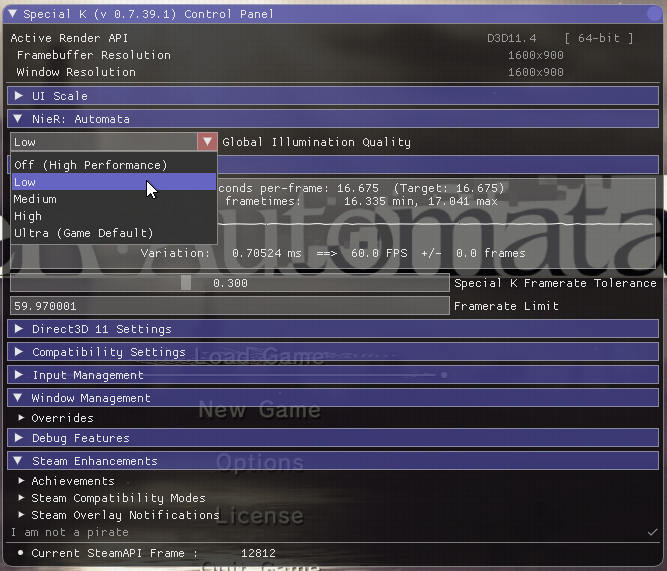
프레임 개선을 위해 스샷에 나온 대로 Ctrl + Shift + Backspace 눌러서 Nier:Automata->Global illumination quality를 Off나 Low로 설정하세요.(Low 권장)
Off(0), Low(16), Medium(32), High(64), Ultra(128)
global illumination quality는 FAR.ini에 저장되고, 나머지 옵션들은 dxgi.ini에 저장됩니다.
[알려진 문제]
- 수동 설치한 뒤에 게임을 처음 실행시키면 전체화면으로 실행이 불가능. 그럴때는 게임을 종료시키고 재실행 해주세요.
- Windows 7 사용자는 https://www.microsoft.com/en-us/download/details.aspx?id=36805 (Platform update. for Windows 7), https://www.microsoft.com/en-us/download/details.aspx?id=26764 (KB2533623)가 설치되어 있어야 합니다
- RivaTuner Statistics Server, Discord and Raptr/Plays TV (mod automatically disables), MSI Nahimic and Razer (any product)는 문제를 일으킬 수 있습니다.